
Trainer AI, Improved Support, Shortcuts, and More
Every trainer now has an AI assistant that already knows their schedule — they text it to book lessons, message clients, and line up follow-up jobs. Support AI got faster and better at reading the situation, a new AI Chat answers plain-English questions from your own data, admins can build one-click shortcuts, and the calendar picked up week and month views, ICS subscriptions, and Google Calendar V2 for everyone.

Our last update was group lessons, event payment plans, and a Google Calendar sync rebuilt from scratch. These last two weeks were spent making every admin dashboard smarter and more helpful. Three new AI capabilities went live in your admin portal, admins can now build their own shortcuts around the app, the schedule got week and month views, and a long list of smaller improvements landed underneath all of it.
Here is what is new.
Trainer AI
Every trainer now has an assistant that already knows their schedule, their clients and teams, and their permissions. There is no setup and nothing to configure. They text it, and the logistics get out of the way.
Scheduling. Add or change availability. Create, modify, or cancel lessons at the right price, time, and category. All in a single text. Admins can coordinate across other trainers' calendars too.
Messaging. Message clients by name, by lesson or group, or by team. Tell the agent who your regulars are, and “message my regulars about the change in my schedule” becomes the entire workflow.
Automated jobs. Schedule work for the agent to do later, once or on repeat. One of our reps asked their trainer AI to message each day's clients with next-day availability and a reminder to ice their arms. The agent set up 18 follow-ups through the end of the month, timed to that rep's actual hours.
Trainer AI also handles credits and facility dollars when it creates events, so a lesson booked by text bills the same way a lesson booked by hand does.
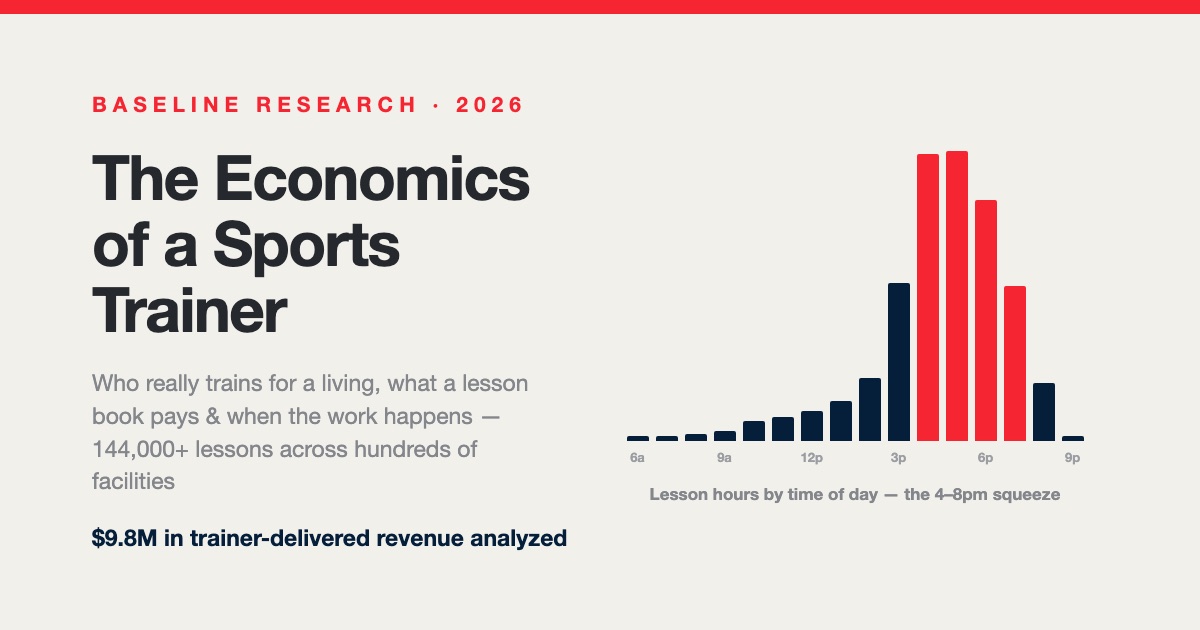
The Economics of a Sports Trainer: Who Trains for a Living, What a Lesson Book Pays, and Why the 4–8pm Wall Decides Everything
Trainer AI exists because trainer hours are the engine of facility revenue. Our study of real operating data maps what those hours are worth — and where they leak.
Read the studySupport AI, upgraded
Our phone support agent got faster, more accurate, and better at reading the situation. It walks callers through your offerings, checks payments, answers FAQs from your facility docs, takes messages, and hands off to a real person when a real person is what the caller needs.
Ask your data anything
A new chatbot connected to your org's data, top to bottom. Ask a question in plain English and get an answer pulled from your own Baseline records. It respects the permissions of whoever is asking, so an admin at one facility sees that facility.
Find it under Admin Dashboard, then AI Chat.
Shortcuts
Admins can now build their own shortcuts around the app. If you have been suffering through two clicks to reach the Grid or AI Chat, that is one click now.
Shortcuts also save filters and searches. Filter the Schedule down to upcoming series, save it, name it, and it is a single click from anywhere. Sort your shortcuts however you like. Shortcuts are yours, not the whole org's — but if you share the URL of a filtered view with another admin, they can see your shortcut filter too.
Shortcuts started in Schedule and now cover Transactions, Teams, and Memberships. We also rebuilt how the side navigation handles overflow, since the old behavior was going to break the first time someone saved fifteen of them.
Two known gaps we're working on
Calendars
Week and month views on both the admin grid and the public grid. The daily grid is still there and still the default. These are for the questions the day view was never good at answering, like how full next month looks.
Calendar subscriptions. ICS links let anyone sync their Baseline schedule to Google Calendar, Apple Calendar, or Outlook. It updates on its own after that.
Public read-only calendar view for sharing a schedule outside your admin team.
Google Calendar V2 is now the integration for every account. We migrated everyone off V1, which clears up the sync failures a handful of facilities were living with. If you missed the story of that rebuild, it took 22 releases.
Cancelled practices no longer appear on player calendars.
Memberships
Memberships that were missing from Reporting now appear there. Sub-memberships show consistently on the customer-facing side.
There is a new option for event-based enrollment proration, so a family joining an enrollment partway through is charged for the portion that is left rather than the full period.
You can also jump straight to a user's profile from the outstanding payment dashboard, which takes a search step out of collections work.
Teams, registration, and rosters
Registration links were letting teams go past their player limit. Fixed, and we traced why the roster limit was not stopping it.
Families with two kids on the same team can now use the invite link more than once. Adding linked users during team registration requires phone and email. Required campaign questions can no longer be bypassed on registration forms. Team promo page links no longer open blank.
Roster player answers are now visible where you need them for team management.
Mobile for parents and athletes
Parents and athletes now have a real home in the mobile app instead of a login and a dead end.
They land in the app through a single flow after signing in, and a family switcher lets a parent move between their kids. The home screen shows live membership status, facility credit balance, a door access and check-in tile, an editable profile for the selected family member, and a “needs attention” section wired to actual data rather than placeholders.
On the Athlete's HQ side, the app was rebuilt. Android login is fixed, the iOS waiver issue is resolved, and we removed a restriction that limited the app to the United States. Admin mobile login no longer shows a black screen.
Emails and messaging
Every email Baseline sends is now properly formatted HTML. Nobody asked for this. They look considerably better.
Beyond the visual change, we tracked down a batch of upstream delivery failures. Reset password and invitation emails were losing their formatting to a sanitization step. Parent logins were getting malformed reset links. Trainers added manually were not receiving reset emails at all. Invite link text was easy to copy wrong, so we rewrote it. Rental booking emails were not reaching admins, and membership notification emails were missing for some accounts.
Smaller changes: new user names appear in signup emails, the HQ address came out of the confirmation email header, and the “schedule a 1-on-1” template now reads correctly for group lessons.
Scheduled messages that were silently not sending now send. Message timestamps display in your timezone instead of UTC. Admins get notified when an athlete leaves a note, on their stats profile or in post-workout notes, with deduplication so identical notes do not turn into a stream of alerts. Workout alerts now go only to the person who prescribed the workout.
Reporting
The timesheet report now includes event names, and exports to CSV.
Search
Users who were not appearing in search now appear. Team search returns consistent results when you press Enter.
Scheduling grid
You can switch the grid between 30-minute and 15-minute resolution, which matters if you run half-hour lessons against hour-long rentals.
Click and drag issues in the grid are fixed. Public grid links no longer appear blank to admin users. Lock pausing works again. Trainer hours with several time slots in one day display in full, and a bug where a trainer showed as fully booked across two different availability slots is resolved. Event times are being stored correctly in the database, which was the root cause under several of these.
Privacy and access
We rebuilt privacy rules across accounts, users, transactions, answers, roster players, and members. In practice this means less cross-facility leakage: waivers stay with their own tenant, the grid stops showing trainers and features from other facilities, and exiting a workout no longer exposes a backend view to athlete accounts.
Smaller things
- Copy to clipboard was broken in several places, including the event link next to contact info. Fixed everywhere.
- Navigation links now appear in the folded mobile nav.
- The facilities' hero image is centered on mobile.
- Lesson name changes persist.
- Home facility is set automatically when an admin adds a user.
- A couple of facility addresses were corrected.
What's next
The mobile app is close. More soon.
Want a walkthrough of the AI features?
If you're already on Baseline, everything above is live in your admin portal. If you're not, this is what modern sports facility management software looks like — see it at baselinepro.com or book a demo.
Less clicking. More coaching.
Baseline is the all-in-one operating system for sports facilities, clubs, and travel teams — scheduling, payments, programming, and team management in one platform.
Keep reading
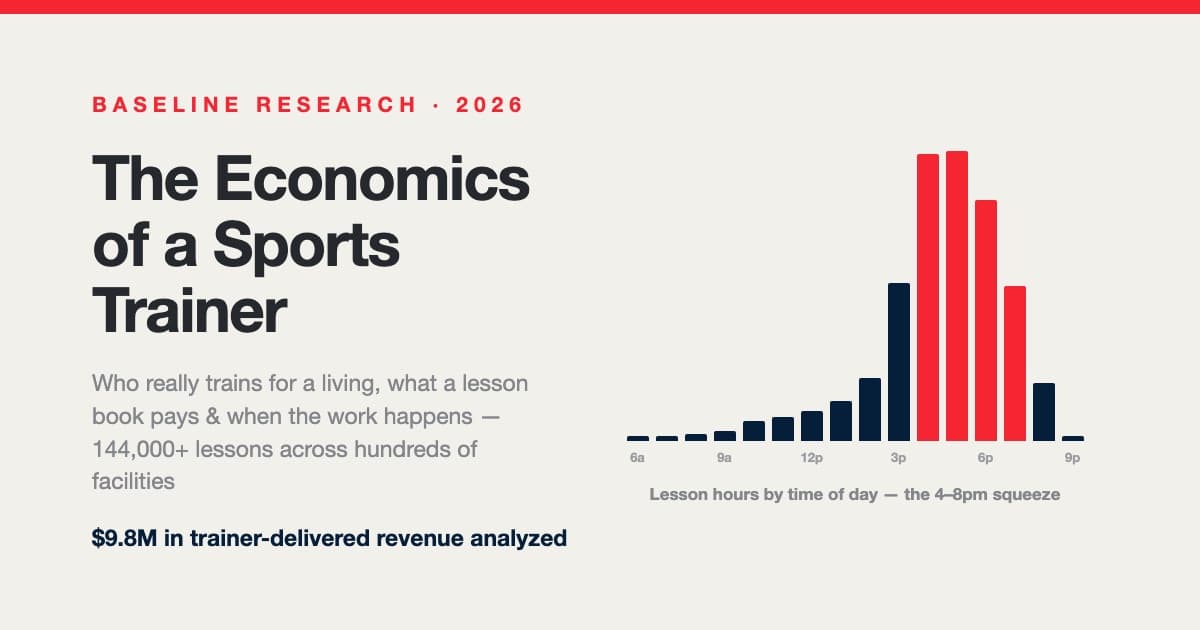
The Economics of a Sports Trainer: Who Trains for a Living, What a Lesson Book Pays, and Why the 4–8pm Wall Decides Everything
Inside a research cohort of training facilities: the full-time lesson trainer is nearly mythical (median 3.3 delivered hrs/week; 4.4% sustain 15+), the trainer split is a spectrum anchored at 50% and 60% that realizes near 47%, lessons run ~$104/hour in every discipline but strength, the median client book is 8 actives on a 90-day clock, and continuing books swing from −61% to +192% in a year — the numbers behind hiring, comp design, and the dependence ledger.

The Secrets of Scaling to a $1M Sports Training Facility
Only 7% of sports training facilities ever reach $1M in annual revenue. Drawing on operator data presented at the ABCA convention, here are the patterns that separate them — and the myths that don't matter.
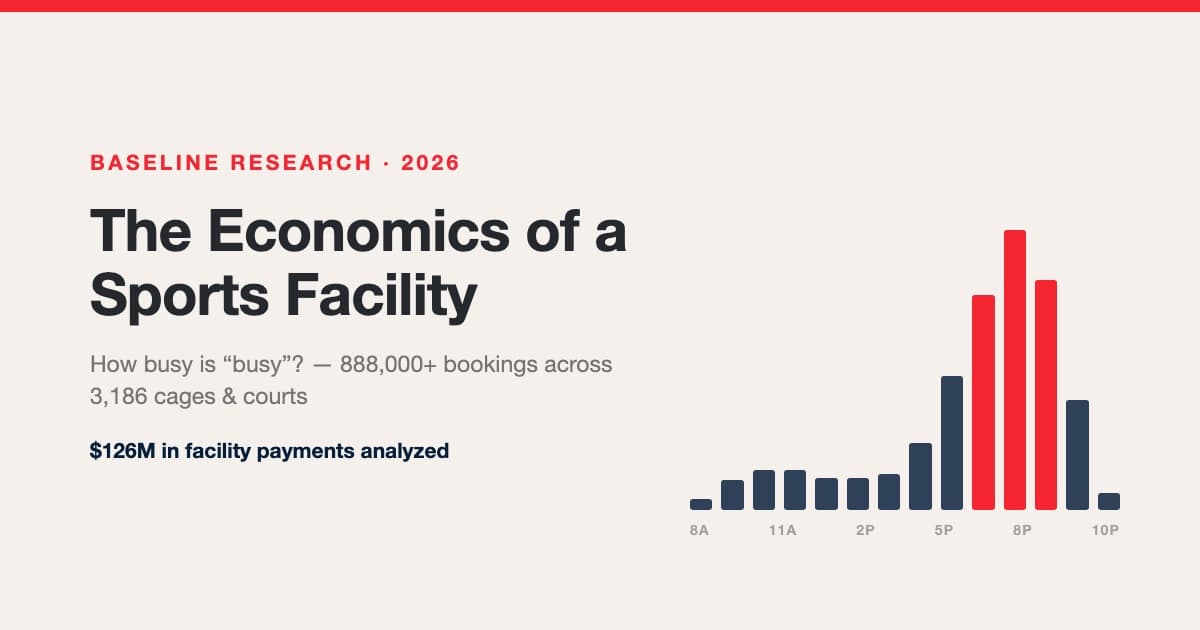
The Economics of a Sports Facility: How Busy Is Busy, What a Space-Hour Is Worth, and How the Packed Facilities Got That Way
We analyzed 888,000+ bookings, 863k space-hours, and $126M in payments across hundreds of sports facilities. Real utilization benchmarks (facilities are spiky, not empty — 2 in 3 sell out prime hours while averaging ~19% occupancy), rentals vs lessons vs group economics, the true lesson margin after trainer splits, credit-pack accounting, seasonality by category, and the occupancy ladder from quiet to packed.