Loading…

Loading…
Predict which members will cancel, project your recurring revenue, see which hours and spaces actually earn, reconcile every deposit against its payments, and ask your own data anything in plain English with AI Chat — analytics and reporting built for sports facilities, not a generic dashboard.
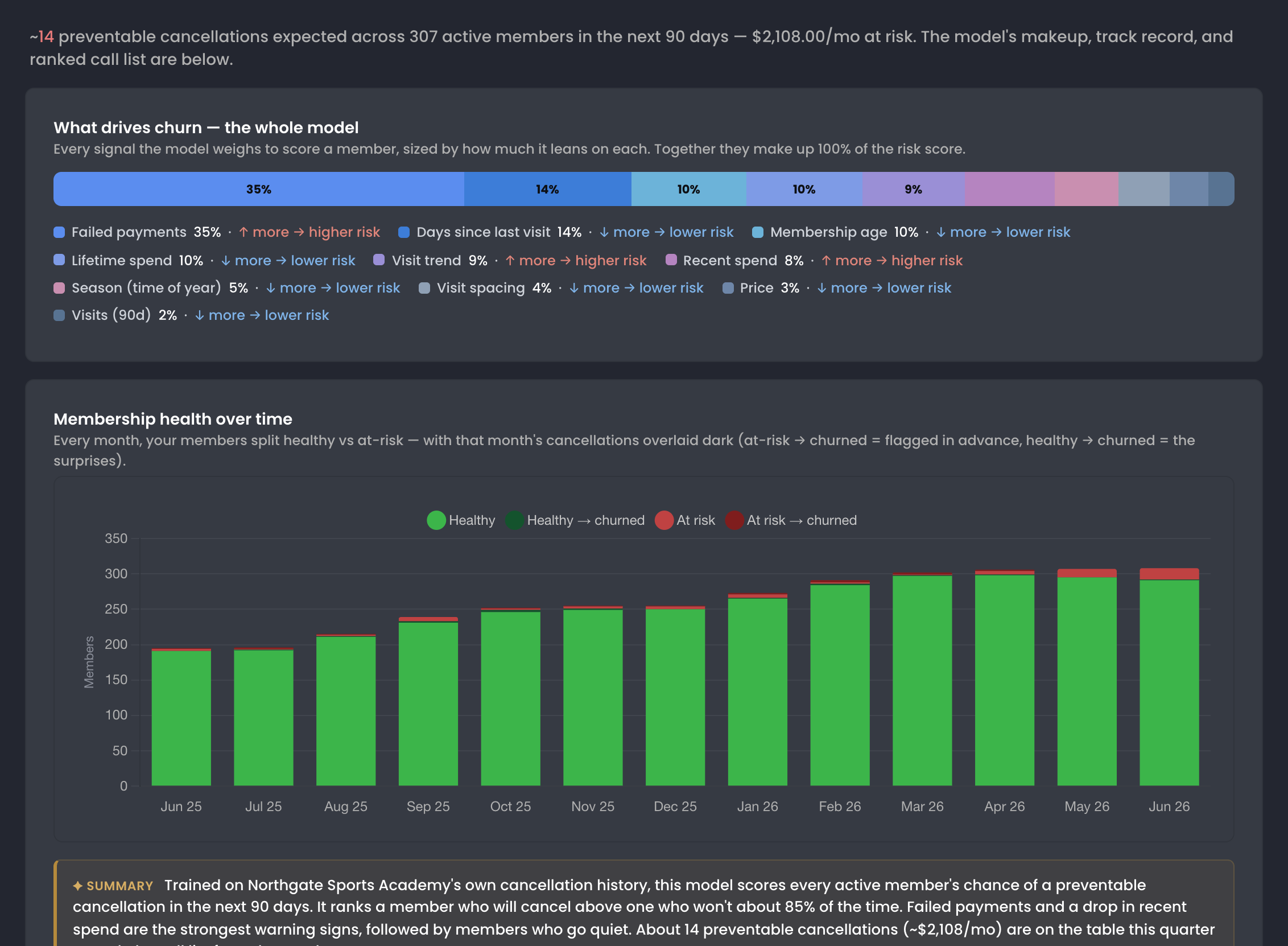
Failed payments, days since the last visit, membership age, lifetime and recent spend, visit trend, season. Member health weighs each one, trained on your own facility's cancellations, and shows which way each pushes risk.
Mostplatformstellyouwhoalreadycancelled.Baselinetellsyouwho'saboutto—amodeltrainedonyourownfacility'shistoryscoreseveryactivemember'srisk,ranksthecallsworthmaking,andshowstherevenueyoucanstillsave.
Across 44,000+ memberships, the median preventable cancellation happens just 87 days after joining — over half of all preventable churn lands in the first three months.
Read the research: The State of Sports Facility Memberships →
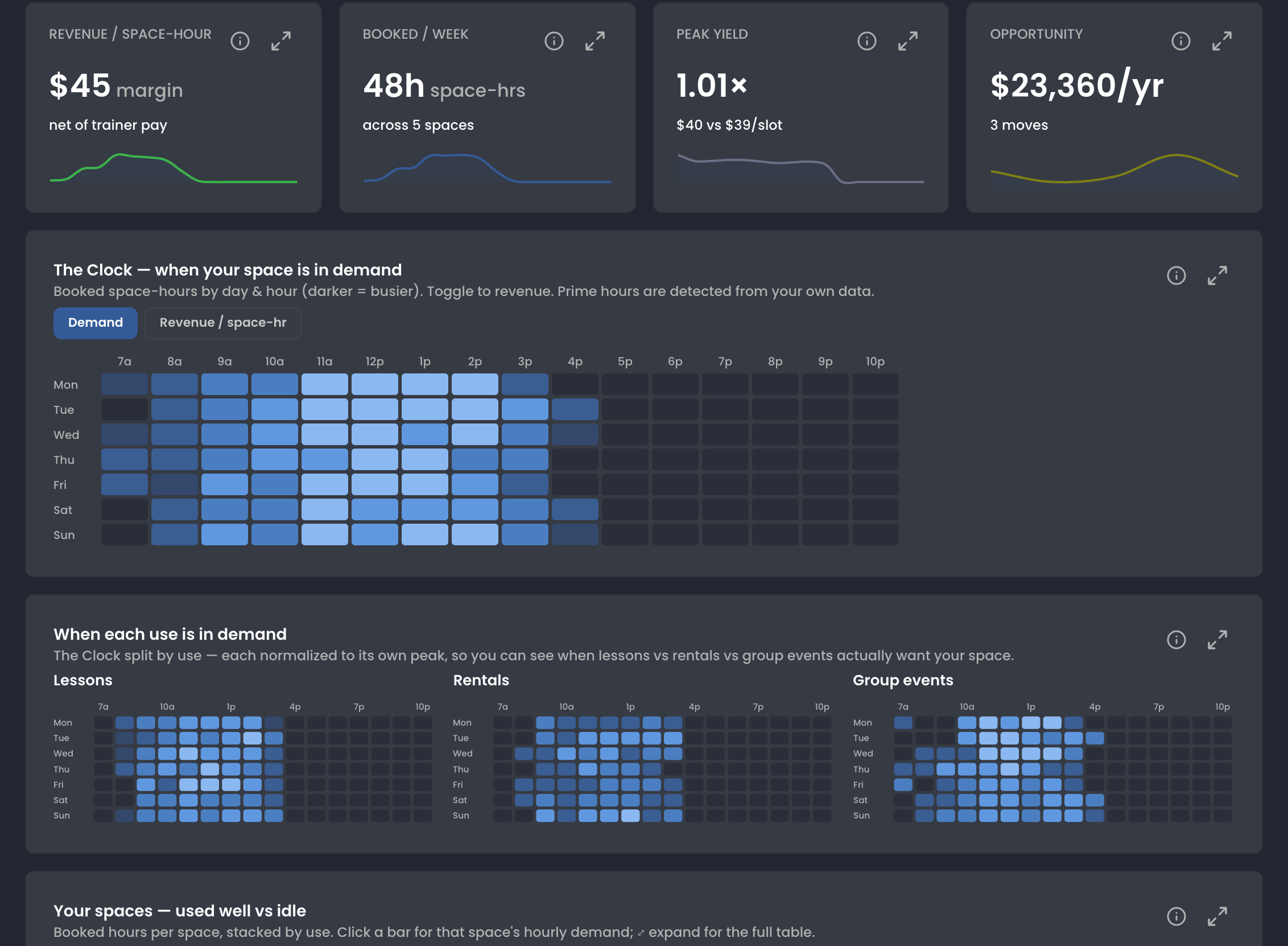
The Clock maps booked space-hours by day and hour, 7a to 10p, with a toggle to revenue per space-hour. Above it: what a space-hour earns after trainer pay, hours booked a week, and the dollars sitting in idle time.
Youcan'tpricewhatyoucan'tsee.Baselineshowswhenyourspaceisactuallyinuse,whateachhourearnsaftertrainerpay,andwheretheidlehoursare—soyoufillthespaceyoualreadyhavebeforepayingformore.
Top first-year facilities offer 40+ events per week by month 6 — and earn 1.8× more. Utilization stays roughly flat across all tiers: customers find bookable inventory and book it, so more on-calendar inventory beats more marketing spend.
Read the research: What Successful New Sports Facilities Do Differently →At the median facility with a real lesson program, the top trainer books 42% of lesson revenue and the whole book spreads across the equivalent of just 3.5 full trainers, despite 9 trainers earning lesson dollars. About a fifth of facilities are effectively one-name lesson programs; as lesson revenue grows the bench roughly doubles but the top trainer's share falls only 15 points — bigger lesson businesses build a bench around a bigger star rather than replacing the star.
Read the research: The Economics of a Sports Trainer →Admin → Accounting lines up each bank deposit against the payments inside it, next to the cash and checks your front desk took and the card money still on its way to the bank.
Mostplatformsgiveyouapaymentsummary.Baselinematcheseverybankdeposittothepaymentsinsideit,flagstheonesthatneedyou,andemailsaworkbookthattieseachpayoutout—sowhenyouraccountantaskswhereanumbercamefrom,youhavetheanswer.
In Settings → QuickBooks, drag each Baseline category from the category bank onto the QuickBooks account it should post to. Baseline support switches QuickBooks on for your account.
Mostaccountingintegrationsdumpdataandhopeforthebest.Baselinemapsyourcategoriesonce,thenpostsoneQuickBooksdepositperpayout—onlyafteryou'verevieweditandthelinesadduptowhathitthebank.

In Settings › Payroll, pick the variables that matter to how you pay coaches: duration, revenue, type, category, number of athletes, prepaid value, credits and more. They become the columns of every payroll report.
Scroll to continue ↓
Trainers who sustain 15+ delivered hours a week run a median 35 active clients a month and gross a median ~$47.5k annualized — right at the U.S. median wage for coaches. At typical 90-day retention, holding a book that size means recruiting roughly a full book of new clients every year.
Read the research: The Economics of a Sports Trainer →
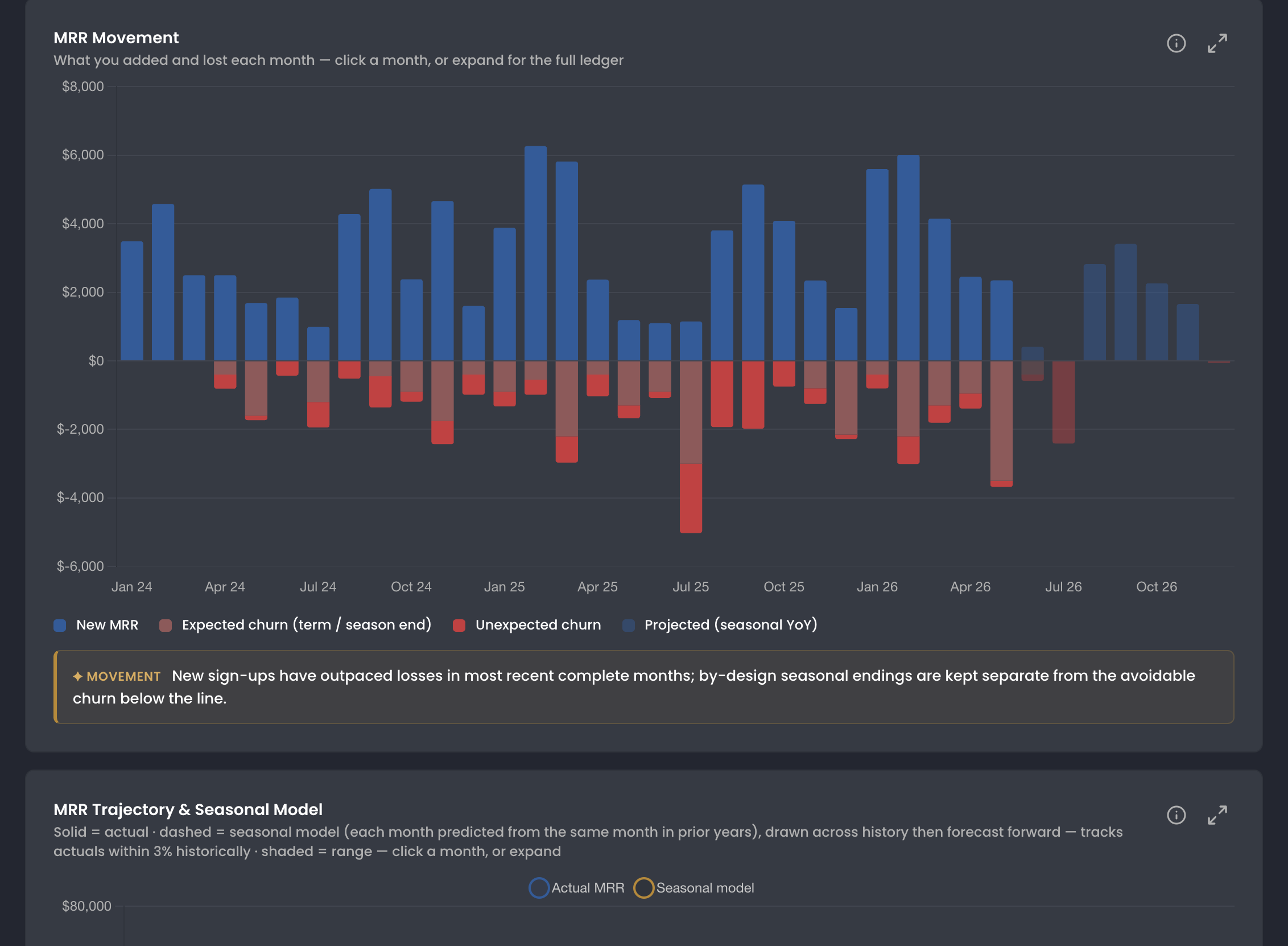
The Memberships report splits every month's change into new MRR, expected churn from terms and seasons ending, and unexpected churn, with a seasonal projection for the months ahead.
“I am constantly shocked about how much baseball facility specific functionality there is. I mentioned a feature idea early on, and it appeared within a few months.”
Yourdatashouldn'tbelockedinsideaplatform.Exportthereportsyourun,pulltheclassicexportsfromOldreports,andseewhereyourmembershipsareheadingbeforethemonthevenstarts.
Facilities that retain 80%+ of their early customers hold 62% of revenue in memberships — vs 39% for facilities losing more than half of their month-1 customers.
Read the research: What Successful New Sports Facilities Do Differently →
Already build email campaigns in Mailchimp? Connect your account, pick the audience your Baseline users sync to and the one campaign leads land in, and keep sending from there. Baseline support switches the Mailchimp module on for your account.
Reportingisn'tadashboardyouignore.It'sthedifferencebetweenknowingyournumbersandguessing.Baselinereconcileseverydeposit,scoreseverymember'schurnrisk,andprojectsyourrecurringrevenue—soyoumakedecisionswithdata,nothope.
Forecast upcoming revenue, age every outstanding balance, and let the recollection AI win back failed payments overnight.
When a membership billing cycle runs, new credits go out, family members stay covered, and door access follows the membership if you use keyless entry.
When a member scans in, attendance is recorded and the check-in review shows their bookings, waivers, and any payments that need attention.
When a parent registers their kid, the roster updates, payment plans activate, and the coach sees a new player.
See how Baseline gives you dashboards, attribution, and insights without spreadsheets — in one 20-minute tour.
Starting free. No credit card required.
Everything you need to know about our sports facility management software.
Yes. The Membership Health report uses a machine-learning model trained on your own facility's history to score every active member's chance of a preventable cancellation in the next 90 days. It adds those up into an expected churner count and the monthly revenue at risk, ranks members into a prioritized call list, and shows the specific drivers behind each score. It predicts preventable churn only — seasonal and durational membership endings are excluded by design — and a backtest shows how many past churners the model would have flagged in advance. It's strongest on facilities with enough history; thinner accounts get a clearly-labeled lower-confidence estimate.
Yes. AI Chat — under Admin Dashboard, then AI Chat — is connected to your org's data top to bottom. Ask a question in plain English and get an answer pulled from your own Baseline records: bookings, memberships, payments, registrations, trainer capacity. It respects the permissions of whoever is asking, so an admin at one facility sees only that facility.
Yes. Baseline projects recurring revenue forward with a seasonal MRR forecast — each future month is modeled from the same calendar month in prior years, then checked against your own history in a backtest. You see collected revenue, revenue already scheduled to come in, and an inferred projection from your continuing memberships. The deepest forecasting, payment-plan, and accounts-receivable views live on the Transactions & Payments page.
Yes. Reporting → Space usage shows when your space is booked by day and hour, what each space-hour earns after trainer pay, which uses earn the most per hour, and where open hours sit idle, with a short list of next moves. For benchmarking, Membership lab compares your median price, 90-day retention, churn, and 12-month growth with comparable facilities as market percentiles — it shows your position, never another business's data.
Admin → Accounting matches every bank deposit to the payments inside it and marks it Reconciled, Action needed, or Contact Baseline, with a plain-English next step when something needs you. The Excel report is emailed to you: a Monthly Accounting tab with every money movement (gross, fees, and net) and summaries by facility, a tab per facility, and a Daily Reconciliation tab that marks each payout Matched or Mismatch.
Baseline support switches QuickBooks on for your account. You connect it under Settings → Integrations → QuickBooks and drag each Baseline category onto the QuickBooks account it should post to. Then, on any deposit in Admin → Accounting, Send to QuickBooks opens a Deposit summary with every payment and its account. Posting creates one QuickBooks deposit per bank payout; the button stays off until the lines add up to the deposit, and a deposit can't be posted twice.
Yes. The Memberships and Revenue reports export to CSV or XLSX, call lists and ledgers have Export CSV, Receivables builds an Excel workbook, and Old reports covers members forecast, offline and outstanding payments, team payment progress, and a full data export. Large exports are emailed to you as a download link that lasts 24 hours.
The Memberships report shows MRR, active members, predicted lifetime value, and monthly churn, filterable by plan. MRR movement splits each month into new MRR, expected churn from terms and seasons ending, and unexpected churn; with enough history, a seasonal model projects MRR forward. It also breaks revenue down by membership type and shows cohort retention by signup month.
Yes. In Admin → Payroll, each trainer's payroll report lists their sessions with type, category, minutes, net, athletes, prepaid, and facility amounts. You set the trainer payout on each line and confirm it, then choose to save it as a rule, save it for later, or treat it as a one-off exception. Rules key on the variables you pick in Settings → Payroll — duration, net revenue, type, category, number of athletes, prepaid value, and facility dollars. Each report downloads as CSV or PDF.