Loading…

Loading…
Sports facility management software for operations, marketing, and everything in between — built for facilities with a lot of moving parts and serious growth ambitions.
Open Create event, pick a type and tell the builder what you want. Type it, say it, or attach a schedule file, and the AI drafts every event for you.
Buildaneventonce,thencopyitweeklyforthewholeseason.Repeateventskeeprollingforwardontheirown,andbookingssynctoGoogleCalendarinyourfacility'stimezone.
The Calendar tab shows every day's events at a glance, from private and group lessons to camps, practices and rentals. Underneath, a searchable list shows each day's bookings with coach, athlete and revenue.
The median lesson trainer delivers 3.3 on-the-floor hours a week, and only 4.4% sustain 15+ hours over a season — because 62.5% of all lesson hours are squeezed into the weekday 4–8pm after-school window. Growing lesson volume means adding trainers and group formats, not waiting for one book to double.
Read the research: The Economics of a Sports Trainer →At cage facilities running both skills, pitching classes are about 0.9× as numerous as hitting classes at the median business and consume roughly as many class space-hours pooled (97%); 45% hold at least as many pitching classes as hitting classes, and about a third of pitching-class hours run inside batting cages. The skill most programs under-plan space for is pitching, not hitting.
Read the research: The Winter Season →Not all hours are worth the same. Weekday 4–8pm sells 34.6% of the trainer time posted into it; weekday 10am–2pm sells 10.5% — same trainers, same facilities, same prices. Across a year the platform's facilities posted 88,000 weekday midday hours and left 79,000 of them unsold, because the athletes they belong to were in school.
Read the research: Why Families Book Lessons →
Your facility's own booking page takes lessons around the clock, no staff required. Families pick a lesson, a coach and their dates, one at a time or weekly, choose a time and pay at checkout.
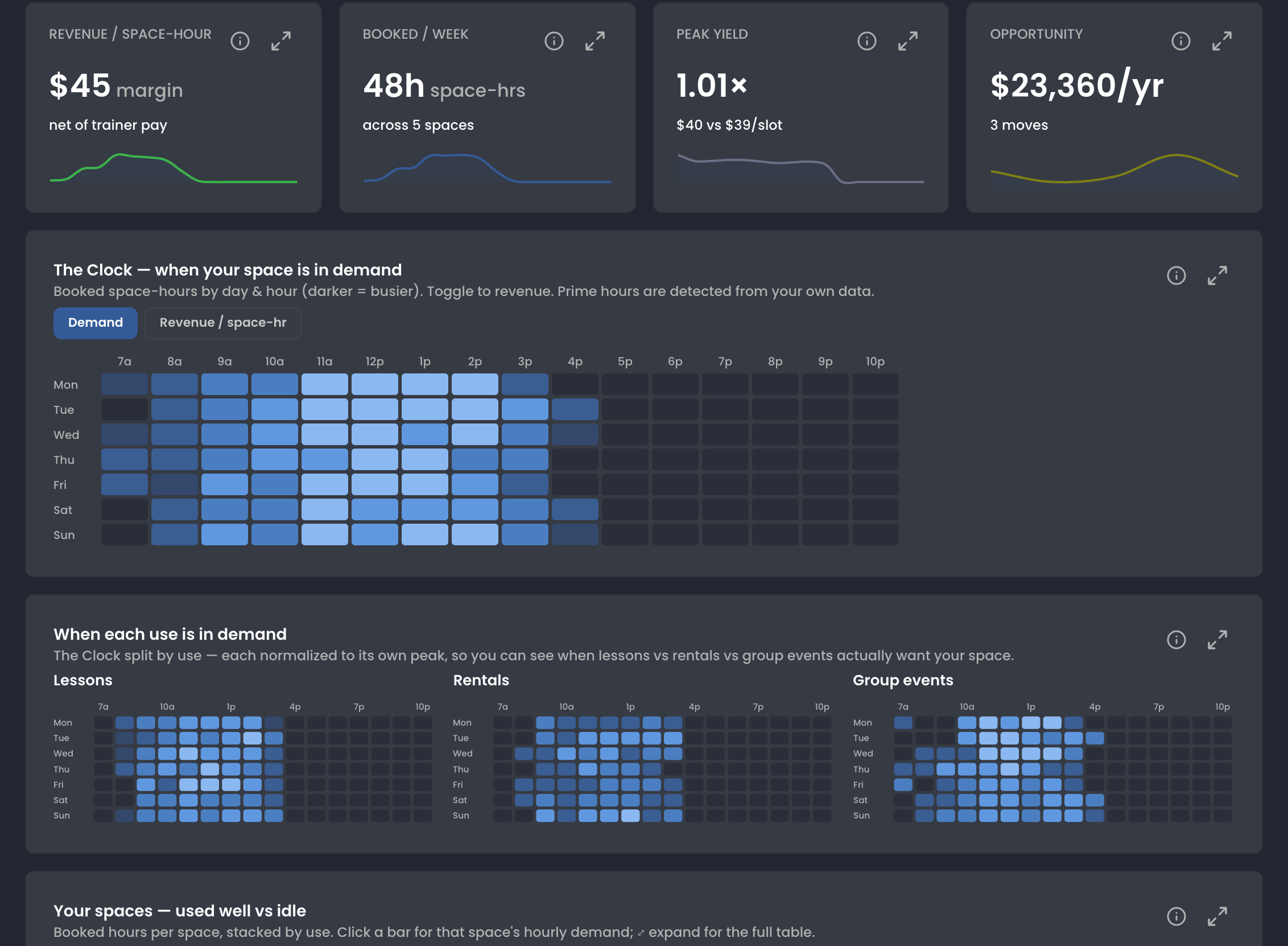
Afullcalendarisn'tthesameasasmartone.Baselineshowswhenyourcagesandcourtsactuallygetbooked,whichhoursearnthemost,andwhereopentimeisworthfilling—soyouoptimizethespaceyoualreadyhavebeforespendingonmore.
The Clock maps booked space-hours by day and hour, 7a to 10p, with a toggle to revenue per space-hour. Above it: what a space-hour earns after trainer pay, hours booked a week, and the dollars sitting in idle time.
Top first-year facilities offer 40+ events per week by month 6 — and earn 1.8× more. Utilization stays roughly flat across all tiers: customers find bookable inventory and book it, so more on-calendar inventory beats more marketing spend.
Read the research: What Successful New Sports Facilities Do Differently →Yourtrainersshouldn'thavetocallyoutosettheirhours.TheytexttheAI,itupdatesthecalendar,andwhentheywant,ittextstheirregularsaboutthenewtimes.
From Schedule › Hours, tap Trainers AI and pick your trainers. The AI texts each one, and they text back the hours they want to add. It's live on the calendar, no portal logins or phone tag.
Scroll to continue the conversation ↓
Yourmembersreadtexts,notemails.Reachtheminstantlywithbuilt-inSMS,emailinthesamesend,andaudiencesyoubuildinafewclicks.
Add by team, tag or user type, remove anyone who shouldn't get it, or intersect to narrow it down. The send list updates with every click and shows how each person can be reached. No spreadsheets, no exports.
Scroll to continue ↓
Text, email and push from one compose screen. Add more than one channel and the same people get every version, each written in its own words. Push goes to members who have your custom mobile app.
“I wish we had this platform when we opened 11 years ago. We tried everything from EZ Facility to a combination of open-source with Stripe, Stax, and other non-integrated software.”

Most competitors route payments through Stripe. When your August registrations spike from $3K to $18K overnight, Stripe's algorithms flag you as fraud. We built a direct relationship with our payment facilitator — the company that actually moves money between your customers and your bank — so there's no middleman making risk decisions about your business.
Red bars = months where Stripe commonly freezes accounts due to "unusual volume"
When your payment processor is a black box, you're one algorithm update away from disaster. When it's a relationship, you have control.
“Stripe froze our account the week of our biggest tournament. $14K held for 90 days — no explanation, no human to call.”
— Facility owner, 2024“We did $3K/mo all spring, then $18K hit in August from fall registrations. Stripe flagged it as suspicious and held every payout for two weeks.”
— Training center operator“We had to take out a personal loan to cover payroll because Stripe held our funds during peak season. There are thousands of people with the same story.”
— Multi-sport complex owner“The BEST customer service around. The team is always willing to listen to suggestions and help whenever you need it.”
“Their support is not only fast and responsive but incredibly creative. It feels like they are an extension of our own team rather than just a tech vendor.”
“Customer service is second to none. The whole crew is very attentive to details and quick to respond to questions.”
A payment facilitator is the company that actually moves money between banks, and it rarely shows up in a sports facility management software comparison. Stripe adds a middleman layer of risk decisions you can't control. We work directly with our PayFac — they handle PCI compliance, tokenization, and processor relationships on our behalf so you get enterprise-grade payment infrastructure without the enterprise complexity.
When something goes wrong with your payouts, you talk to our team — not a chatbot or a 10-day email queue.
August registrations and December camps are expected, not suspicious. We model your revenue pattern so spikes never trigger a freeze.
If there's ever a delay between processing and your bank, we cover the gap with our own dollars. Your staff gets paid on time.
No algorithms treating seasonal businesses like fraud. Your revenue pattern is expected, modeled, and protected.
When a card declines, Baseline tries it again overnight: the next night, two days later and a week later. Each failed attempt emails the family a link to update their card, and anything still unpaid waits in Outstanding payments with Recollect all one click away.
Automatic attempts run nightly, up to four per payment.
Take payment at the front desk with Instant checkout. Charge a card, record cash or another offline payment, sell products from your catalog, use credits, or send an invoice, all from the Pay button.
Themomentsomeonewalksinisthelasteasymomenttofixanything—thewaivernobodysigned,thecardthatexpiredlastmonth,theinvoicenobodychased.Baselineputsallofitononescreenwhilethey'restillstandingatthedesk.
A member hands over a gym card, holds up a QR code, or shows a barcode on their phone. Baseline opens one review with everything your front desk normally hunts for across profiles, invoices, waivers, and the schedule — and tells staff whether this arrival is all clear or needs attention.
In one popup
Scan any way you operate
Physical gym cards, member QR codes, phone barcodes, a posted facility QR, or a manual athlete lookup for open gym.
Know what needs attention
Missing waivers, late or failed payments, expired cards, and past-due memberships surface before the athlete disappears into the gym.
Record the right attendance
Check members into the session they actually booked, or create an open-gym visit on the spot so drop-ins still show up in reporting.
Front desks don’t all work the same way. Baseline supports QR and traditional barcode credentials built for common front-desk scanners — plus manual lookup and a public phone-verification fallback when someone shows up without anything to scan.
Northgate Sports Academy
2000143
Northgate Sports Academy · (555) 010-0187
Open a member's record, scan a printed card once, and that card becomes their check-in credential — no separate access-card system to buy or run.
Check-in code
Show this at the front desk to check in.
Every eligible member gets a generated check-in code and image on their profile. If one is ever missing, Baseline creates it the moment the profile loads.
Check-in code
Show this at the front desk to check in.
Choose whether your account generates QR codes or traditional barcodes for common front-desk scanners. Existing credentials keep working until they're reissued.
Check in here
Northgate Sports Academy
Post your location's QR code at reception, the entrance, or a self-service station. Scanning it opens a branded check-in page for that location.
Open gym sign in
Jamie Brooks
Renews 11/01/26
Casey Brooks
Renews 11/14/26
Search eligible athletes as you type, filter by membership, and see each athlete's photo, membership, and renewal date before you check anyone in for open gym.
Check in at Northgate Sports Academy
Enter your phone number and we’ll text you a code to check in.
As a public fallback, a member enters their phone number, gets a six-digit code by text, and verifies it — with clear handling for unknown numbers and bad codes.
Duplicate-card detection stops one physical card from being assigned to two members.
Issue a fresh check-in code whenever a card or QR code needs replacing.
The old credential is revoked automatically, so a lost card stops working.
Every recognized scan opens the check-in review. Your team decides what gets checked in, resolved, or collected — with the whole picture in front of them.
Turn on Auto Front Desk Checkin and a recognized scan checks the member into an eligible booked session near that time, or records open gym if there isn't one. The popup still opens, so staff keep visibility.
Turn on Auto Self Checkin for your facility QR and a signed-in member can check themselves in. If it's off, they get the same readiness view and choose the session or open gym themselves.
Connect Kisi or a Seam smart lock and door access follows each membership. Baseline grants it while the membership is active and removes it when the membership is past due, unpaid, or cancelled, so nobody has to remember to change a door code.
Kisi
Kisi groups follow membership status for the member and their linked family.
Seam smart locks
Yale, August, Schlage, and more. Pick which doors each membership opens.
Bookings too
Rentals, lessons, and events open the door for their booked time.

Offer enrollment on a weekly class and families sign up once. Baseline puts them on every session in the series and bills the enrollment like a membership, monthly or yearly, until they cancel or the series ends. Every enrollment shows up in Sales with its recurring revenue.
Enrolled athletes are added to every session in the series automatically. No re-booking, no manual adds: they're on the roster for Tuesday Hitting Group at 4pm every week because that's their enrollment.
Group training generates roughly $0.72 per square foot per hour vs $0.17 for 1-on-1 lessons — 4× more revenue per square foot, while building the community that converts to teams.
Read the research: The Secrets of Scaling to a $1M Sports Training Facility →
Parents link every athlete in their family to their own account, then register, sign paperwork and pay for each kid from one login. Kids can still get an invite of their own when they're ready.
Each person on a family account has their own alerts, reminders and channels: email, text or push. Parents switch to a kid's profile from the Family chips to set theirs, so the right person hears about every practice and payment.

In Settings › Payroll, pick the variables that matter to how you pay coaches: duration, revenue, type, category, number of athletes, prepaid value, credits and more. They become the columns of every payroll report.
Scroll to continue ↓
The going facility–trainer revenue share is 60% on paper (IQR 50–70%), but across all comp structures the median trainer's realized share of what sessions actually collect lands near 47% — hourly pay and membership-included lessons dilute the base, and even %-comp trainers realize ~5 points under their own split. Facilities that configure comp terms in-system are the only ones who can see their true lesson margin.
Read the research: The Economics of a Sports Trainer →
Ask your longest-standing members for a Google review. One click opens a message with your review link already in it, ready for you to send, and new reviews that still need a reply are flagged.
Scroll to continue ↓
Real marketing infrastructure built into your sports facility management software — so you can fill programs, retain members, and measure what's working.
Google Reputation
Ask members for a Google review with a pre-filled message you send. Track your rating and see which reviews still need a reply.
Tracking Links
Every program gets its own short link. Event links show how many clicks they get.
Landing Page Builder
Build a custom landing page with the drag-and-drop builder and publish it in place of your standard one (Pro).
Email & SMS Blasts
Segment by tags, membership, or activity. Send targeted messages in seconds.
CRM Tag Manager
Organize contacts with custom tags for smarter outreach and audience segmentation.
Attribution & Reporting
See which Google and Meta ad clicks became leads, sign-ups and revenue.
Scheduling, payments, memberships, marketing, website, and reporting — operations and growth under one roof.
The numbers facilities see after switching to Baseline.
Predictive churn scoring, revenue forecasting, and reconciled accounting — every number from across the platform in one place.
Forecast upcoming revenue, age every outstanding balance, and let the recollection AI win back failed payments overnight.
When a membership billing cycle runs, new credits go out, family members stay covered, and door access follows the membership if you use keyless entry.
When a parent registers their kid, the roster updates, payment plans activate, and the coach sees a new player.
See how Baseline replaces your scheduling tool, booking widget, payment processor, local rank tracker, review tracker, and access system in one 20-minute tour.
Starting free. No credit card required.
Everything you need to know about our sports facility management software.
Absolutely. Each resource (cage, tunnel, field, studio) can have its own hourly rate, and you can set different prices for different time slots or event types.
Trainers set their own weekly availability inside Baseline. When a customer books a lesson, they only see time slots where the trainer AND the required resource are both open — no double-booking possible.
Yes. Group lessons are their own session type in Baseline — separate from private lessons and events, not either one bent into shape. Small-group training, position clinics, and skills sessions all run as group lessons.
Yes. Switch the grid between hourly and 15-minute increments depending on how tightly you book. The time range follows your operational hours too — no scrolling through a full day you don't use.
Yes. Both the admin grid and the public grid have week and month views alongside the daily grid, which stays the default. The day view runs your floor; week and month views answer the planning questions, like how full next month looks. There's also a public read-only calendar view for sharing a schedule outside your admin team.
Yes. Every booking creates a Google Calendar event automatically, and cancelling it deletes the event — in your facility's timezone, not the timezone of whoever is logged in. Events already on your schedule batch-sync from your profile page, and the connection page reports real status if a sync ever breaks. Anyone can also subscribe to their Baseline schedule with an ICS link from Google Calendar, Apple Calendar, or Outlook — it keeps itself up to date after that.
Yes. Admins can build one-click shortcuts to the Grid, AI Chat, or any saved filter — filter the Schedule down to upcoming series, save it, name it, and it's a single click from anywhere. Shortcuts cover Schedule, Transactions, Teams, and Memberships, and each admin's shortcuts are their own.
Yes. Open the member's record, scan a printed card once, and Baseline saves it as that member's check-in credential — no separate access-card system to buy or run. Duplicate-card detection stops one card being assigned to two people, and issuing a fresh check-in code revokes the old card or QR code automatically, which is what makes replacement cards practical. You can also check members in with their personal QR code, a barcode on their phone, a posted facility QR code, or a manual athlete lookup.
One popup per scan. It shows today's and upcoming bookings, whether the member is already checked in, booking payment status, membership and enrollment status, upcoming recurring payments, outstanding or failed payments, payment methods on file (including expired or invalid ones), required waivers, and linked family members. A single all-clear or attention-needed signal sits at the top, so staff know whether anything needs handling before the member walks back to the floor.
That's your call — Baseline supports three arrival modes. Staff-assisted opens the check-in review on every recognized scan and leaves the decisions to your team. Auto Front Desk Checkin checks a recognized member into an eligible booked session around that time, or records open gym if there isn't one, while still opening the popup so staff keep visibility. Member-led lets you post your facility QR code so members check themselves in.
Straight from the check-in review. If there's no booked session, staff can create the open-gym attendance record on the spot — Baseline creates a one-off, one-hour open-gym event and checks the member in, so unscheduled usage shows up in reporting alongside booked sessions instead of disappearing.
Yes. Choose which waivers are required for check-in and Baseline combines them with anything already required at login, compares that list against the member's signed records, and flags what's missing in the review. Staff or the member can open the full waiver text and complete it right there, with the signer, timestamp, and check-in context preserved. Facilities that want a formal signature experience can route members through the full signature flow; others can use the streamlined acknowledgment.
Yes. If you connect Kisi or a Seam smart lock, door access follows the membership: when a membership with door access is no longer active (past due, unpaid, or cancelled), Baseline removes access for the member and their linked family, and gives it back once the membership is active again. No manual intervention required.
Yes — we handle migrations regularly. Our onboarding team will transfer your users and credit cards on file so you can pick up right where you left off, typically in about 7 days.
Yes. Baseline is built for complexity — whether you have one facility or ten. Each location gets its own resources, schedules, staff, and pricing while sharing a single member database and reporting dashboard. Admins who belong to more than one organization in Baseline choose which one to open from a searchable list at sign-in.