
Bigger & Better Teams, Magic Recollect, Text-to-Register, Roster Builder, AI Integration, and so much more
A complete platform rebuild: text-based team registration, automated payment recovery with Magic Recollect, AI team and payment-plan builders, Home Facilities, a drag-and-drop Roster Builder, and end-to-end tryout management.

About a year ago, we realized Baseline's team features were holding us back. Three roster screens to do one job. No way to send a registration link with a custom payment plan. Admins were still using spreadsheets to track what Baseline was supposed to track for them.
So we tore it down and started over with the goal of streamlining everything.
That's essentially what this update is: a complete platform rebuild from the ground up. This is our third rebuild, and the first one we'd call totally comprehensive.
The Big Shifts
Text-Based Team Registration
Parents can now accept a team invite, complete registration, and submit a payment entirely over text without ever logging in. The invite text includes three links: a magic login to accept, a magic login to decline, and a link to a custom team page with more information about the team. Parents can also reply to the text with "accept" and answer follow-up prompts through the thread itself. Waivers, registration questions, and payment input all happen through SMS, with the payment step routed to a secure link.
For returning families, Baseline now surfaces previously used cards and bank accounts at the payment step, so checkout can complete in a single tap.
What this means
Magic Recollect
Admins can officially stop chasing payments one parent at a time. For a club running fifteen teams with three outstanding balances each, what used to be forty-five separate phone calls or emails is now one click of Magic Recollect inside your sports facility management software.
Magic Recollect is our new automated payment recovery tool that does for payment collections what Magic Reminders did for registrations. It scans every player on a team with an outstanding balance, generates a custom text to each parent listing exactly what they owe, and sends a direct payment link to them.
We've also added a settings option to CC coaches or team managers on every automated recollection notice, so coaches stay looped in on payment status without setting up forwarding rules outside Baseline.
AI Team Builder and AI Payment Plan Builder
A club director can now build their entire fall season — including teams, payment plans, and invite groups — in under five minutes instead of an afternoon.
Team creation now works identically to our Event Builder. Admins prompt the system in plain English ("four teams for 14U through 18U") and Baseline spins up the team structure using data already in the account. The full step-by-step builder is still there for admins who want manual control.
The Payment Plan Builder works on the same principle. Type "$500 due at registration and $2,000 over 5 months starting August 1st" or "$2,500 over six monthly payments starting September 1," and our builder generates a plan with correct dates, totals, and routing. We're the first platform to ship AI-generated payment plans, removing one of the most click-heavy admin workflows across the entire industry.
Home Facilities
In our humble opinion, this is the layer that scaling clubs have needed (and no one else has built). If you run nine locations across three states, you can now route every fee on every team to the right business entity from a single Baseline account.
Operators can now organize teams by facility, division, or franchise location. Each facility supports its own policies, multiple bank accounts, and per-team deposit routing.
Different Custom Invite Links Per Team
No more workaround spreadsheets to track which family is on which fee plan.
Teams used to have one shareable invite link. Now they support unlimited custom invite links per team, each with its own payment plan and messaging. Operators can build a $2,500-over-six-payments link for hitters, a $1,800-over-six-payments link for pitchers, and a separate link for coaches' kids with no fee at all, and assign each to the right group.
Pricing structures that used to require separate teams or manual workarounds now live on a single team.
New Ways to Invite Players to a Team
Admins now have three distinct invite paths on a single team page:
- Drag-and-drop a player from search results onto the roster — best for tryouts.
- Click the plus button to manually invite one athlete at a time — best for adding a single new family.
- Share a custom invite link — best for broader recruiting pushes.
Drag-and-Drop Roster Builder
Building a roster is now a single-page experience. Admins drag athletes from search results onto invite blocks to send invites, or drop them onto a "did not make the team" block to trigger the rejection message. The entire roster for a team gets built in one window instead of routing through sequential pages.
Cross-App Search Across Users, Teams, and Events
The search powering the Roster Builder runs against three data sets at once: registered users, past teams, and historical events. Type "test" and you get every team named test, every event named test, and every user named test, alongside roster players who appeared on prior teams. Every athlete who attends a tryout becomes searchable as a roster player without a second registration.
Performance Data on Player Cards
Inside the Roster Builder, admins can pull any data point captured in their baseball facility management software onto a player's card: fastball velocity, exit velocity, tryout scores, coach grades, and registration question answers (positions played, age bracket, anything captured at signup) all surface alongside the player.
What this means
End-to-End Tryout Management
Tryouts, data collection, evaluation, and team selection now happen as one continuous flow in Baseline. Run the tryout, capture data through the data collection tool, search up the event, pull every athlete into the Roster Builder, surface tryout scores on each player, and drag them onto teams or rejection blocks. No exports. No second tools. No emails to coaches asking what they thought of player #23.
Custom Team Page Builder
Every team now has its own customizable page, separate from the default roster and schedule view. You build it with a drag-and-drop builder that works like Squarespace. Pages support published and draft states.
Each team can also have a dedicated promo landing page used for advertising tryouts, schedules, or recruiting pushes. Promo pages share the article framework, so they can be archived, kept private, or made public, and shared by direct link.
Operators can officially stop relying on shared parent text threads to communicate team info. Schedules, dress codes, sponsor logos, and photo galleries all live on a team page the operator controls.
Further AI work is underway to give the builder memory and context, so it can pull team dates, coach names, and calendars automatically without manual entry.
Target Players and Target Revenue Per Team
Operators can set explicit goals on every team: a target player count and a target revenue number. The Teams dashboard shows registration progress and revenue progress against those goals. Discounts applied to specific players don't count against the team's revenue goal, so the numbers stay honest.
The main Teams page now opens with a visual chart of how every team is onboarding and how every team is collecting payment, in one view. Admins can still drill into specific player segments (such as outstanding registrations) from the same page.
A facility owner running thirteen teams can look at one chart and see which teams are on pace, which are short on registrations, and which are tracking under revenue goal.
Split-Account Payment Routing
Payment plans can split a uniform charge to one bank account, training to another, and a national affiliation fee to a third, with memberships bundled in. For scaled club operators running multiple business entities, this is daily reality. Until today, no one else has solved it in one place.
Payment plans are now first-class objects that can be saved, reused, and copied across teams and invite groups instead of being rebuilt from scratch each time. They also support per-payment control over the date the payment runs, the bank account it deposits into, and the category or subcategory it's tagged as (uniform, lessons, tournament fees, national affiliation fees, and so on).
HTML-Formatted Invite Emails with Embedded Actions
Outgoing invite emails are now fully designed HTML emails with Accept and Decline buttons baked into the body. Parents no longer click to separate pages to respond. On desktop the new emails render as a polished, brand-aligned communication rather than a plain-text notification.
Cross-Referenced Notes on Athletes and Admins
Coaches and admins can now stop relying on memory or text threads to remember context on a family. Admin and athlete profiles now include a notes view that surfaces every note ever taken on that person, with the ability to jump between linked users (an athlete and the parent admin attached to them, for example) without losing context. Switching between the athlete and the parent admin keeps both sets of notes visible.
Saved and Suggested Payment Methods at Checkout
When a returning user reaches the payment step, Baseline now surfaces their previously used cards and bank accounts and suggests them for reuse. Existing customers complete payment with one click instead of re-entering details.
Invite Groups Can Now Enforce Capacity Limits
Teams can restrict how many players can register through a specific invite, and the registration flow now supports the capacity-limited invite behavior.
Voided Invites Handled More Safely
Instead of fully removing invite records, voided invitations are now soft-deleted so they disappear from the front end while preserving the backend structure needed to handle old links and related data.
Parents Are Now Notified When New Invoices Are Added
When a new player invoice or team invoice is created after registration, users are no longer left to discover charges only when a card is hit later.
Payment Preview Is Easier to Use During Registration
The payment preview can now stay collapsed until a parent opens it, which reduces scrolling and makes multi-plan registration screens easier to scan.
Rejected-Player Actions Are Clearer
Admins now get a clearer visual signal after a player has been added to a rejection flow. This experience now tells whether the rejection was already sent, avoiding duplicate sends. The visual no-offer state also persists on the player record so admins don't accidentally re-send the same roster update message to a player they already cut.
What We Improved
- Communication rebuilt on reusable components. The entire communication layer (invite emails, recollection texts, registration confirmations, roster update messages, the new SMS reply flow) was rebuilt on a reusable component architecture. This is why HTML emails, three-link texts, and conversational SMS replies all share consistent branding and behavior.
- Player profile redesigned as a sidebar. Clicking a player now opens their information as a sidebar panel instead of expanding a large inline block under the row. The sidebar surfaces notes, linked users, payment history, and profile data in one place without pushing the rest of the page out of view.
- Auto-collection defaults and visibility. "Automatically Attempt Collection" now defaults on where expected. Late-joiner fees that have auto-collection disabled are surfaced more clearly, instead of forcing admins to hunt through details. The new past-due workflow routes late signups through this same visibility surface so admins can manage them as a batch.
- Facility and payment-account fields are more reliable. Payment plans now better inherit facility-related information. Empty "Record to facility" and "Deposit to account" states were addressed when a team already had a facility configured. Changing a facility is less likely to leave the payment setup in a broken state.
- Payment-plan selection is clearer. The plan picker uses checkbox-style selection to better communicate that multiple choices can apply. The builder and copy flows are less confusing when multiple plans, invite groups, or favorites are involved.
- Terminology is more consistent. Financial information previously displayed as "refund $" in one dashboard and "facility $" in another is now aligned more closely around the facility-dollar concept.
- The Teams sidebar is easier to read. A wider side panel makes the registration and payment detail view more usable.
- Email and invite presentation polished. Outgoing invite email branding was updated from baseline.io to baselinepro.com where appropriate. Redundant support links were removed so end users are pointed more cleanly toward the right admin or facility contact.
- Team-builder and creation UI clearer. Blurry or illegible creation bugs were cleaned up. Clicking team names behaves more predictably when expanding or editing teams. Linked-user navigation now takes admins to the relevant Teams view instead of dumping them into Calendar.
What We Fixed
Rebuilding Baseline from the bedrock gave us the chance to fix a lot of edge-case bugs at once. Here's what shipped.
Registration, Invites, and Acceptance Flow
- Direct invite links now behave more reliably for users who need to create an account first — users are redirected back into the accept-and-confirm flow instead of getting stranded after sign-up.
- Athlete invite links were stabilized. The magic-link flow that signs a user in, accepts the invite, and routes them to the right profile or team state had several moving parts; the broken or inconsistent behavior was fixed.
- The side panel no longer shows the wrong invited user, addressing confusion between roster-player records and linked-user records during invite flows.
- Unaccepted invite states are clearer. Instead of showing upcoming fees as misleading $0 entries with no explanation, the UI now includes a clearer visual indicator for unaccepted-plan scenarios.
- Roster-player naming was corrected. When an athlete is invited from the Roster Builder, the athlete's name is now prefilled correctly instead of the parent's name.
- Registration-complete email behavior was fixed (one report showed the email being sent twice one day and then not at all the next).
- Broken team page links that opened blank pages due to branch or version URL mismatches were corrected.
- Registration is now blocked for users with past-due balances when the new "Require up-to-date payments before team registration" toggle is enabled. Parents see a clear list of what they owe; admins can override at their discretion.
Exports, Lists, and Navigation
- Registration exports now better reflect payment progress. Transaction and export structure is closer to the new Teams model, aligning columns that still reflected the old "team fee" framing.
- Linked-user navigation now opens the relevant Teams context instead of routing admins to Calendar.
Team Profiles and Forms
- Team question and player profile answers now persist more reliably. A bug where multiple-choice profile selections disappeared after refresh was fixed.
- The player profile and registration side-panel state are more stable. Several issues tied to saving, linking, and displaying registration and profile context were cleaned up as part of the broader rebuild.
The Four Headline Behaviors
- Void invites. Invite records are handled with safer soft-delete behavior. Expired and voided invite state is more reliable.
- Capacity-limited invites. Invite groups can enforce player limits, and registration messaging is better aligned with those limits.
- Auto-collection disabled visibility. Disabled auto-collection now has clearer visual treatment, with improved admin and payment-side signals.
- Registration blocking for past-due linked users. The release work around registration, text-to-register, linked users, and payment validation tightened this flow and the surrounding experience.
What This Means If You Run a Facility, Club, or Travel Team
For single-facility operators, this update mostly shows up in the small wins. Tryouts collapse from a multi-day workflow into a single afternoon. Registration drop-off goes down because parents complete enrollment over text. The dashboard chart finally tells you which teams are on pace without a spreadsheet.
For multi-location clubs and franchise operators, this update is a different product. Home Facilities, granular payment routing, and saved payment plans are the layers that let scaled clubs run without manual reconciliation between business entities.
For travel-team-only organizations, the headline features are Magic Recollect, multiple custom invite links, text-based registration, and the AI Payment Plan Builder. The four things you do most often — chase payments, build invite groups, get parents enrolled, and set up payment plans — just got faster by an order of magnitude.
For everyone, the rebuild rolls out to all Baseline customers at no additional cost.
What's Next?
Our team is working to give the AI Page Builder memory and context, so it can pull team dates, coach names, and calendar data into pages automatically. Contracts also got a complete rebuild in parallel, shipping under their own launch soon. We're already collecting feedback from the first wave of operators on what to ship next in Teams 14, so stay tuned!
If you're already on Baseline, the update is live. If you're not, you can see the new platform at baselinepro.com.
Baseline is the all-in-one operating system for sports facilities, clubs, and travel teams — scheduling, payments, programming, and team management in one platform.
Keep reading
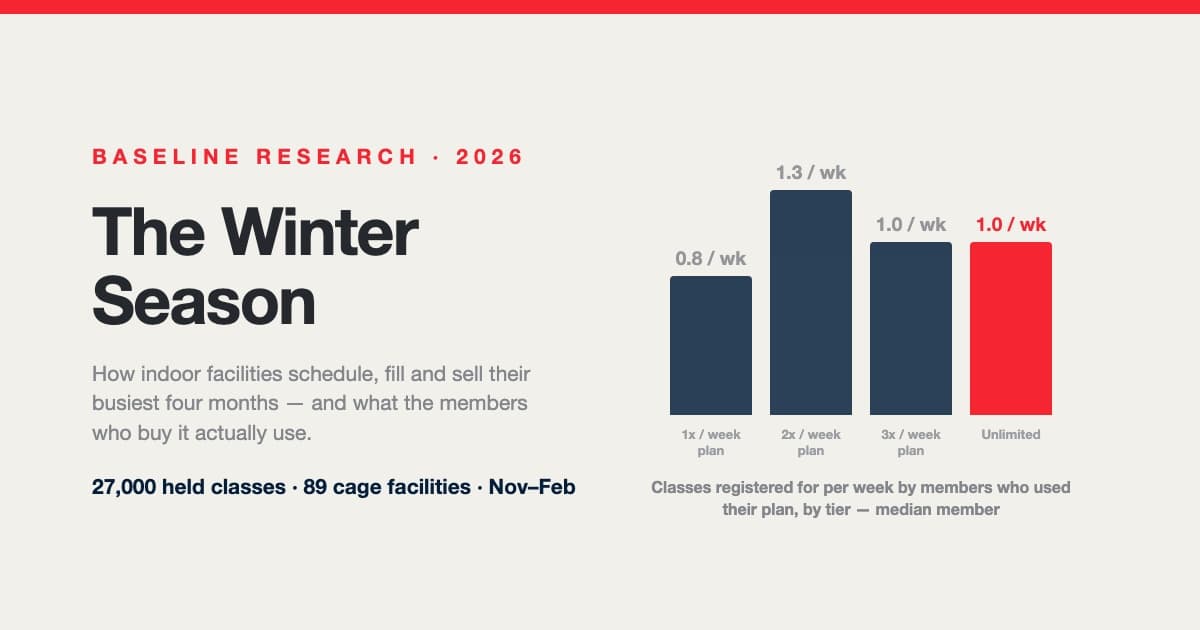
The Winter Season: How Indoor Facilities Schedule, Fill and Sell Their Busiest Four Months
Winter is the season an indoor facility is built for, and every autumn operators rebuild the same schedule from instinct. Across 27,000 held classes at 89 cage-equipped facilities: pitching needs nearly as much room as hitting, the median class has three or four athletes, one hitting program in ten runs every prime hour, classes tie up two-thirds of the cages only at the busiest hour, “unlimited” members come about once a week — and the plan a family buys, not how often they come, decides when they leave.
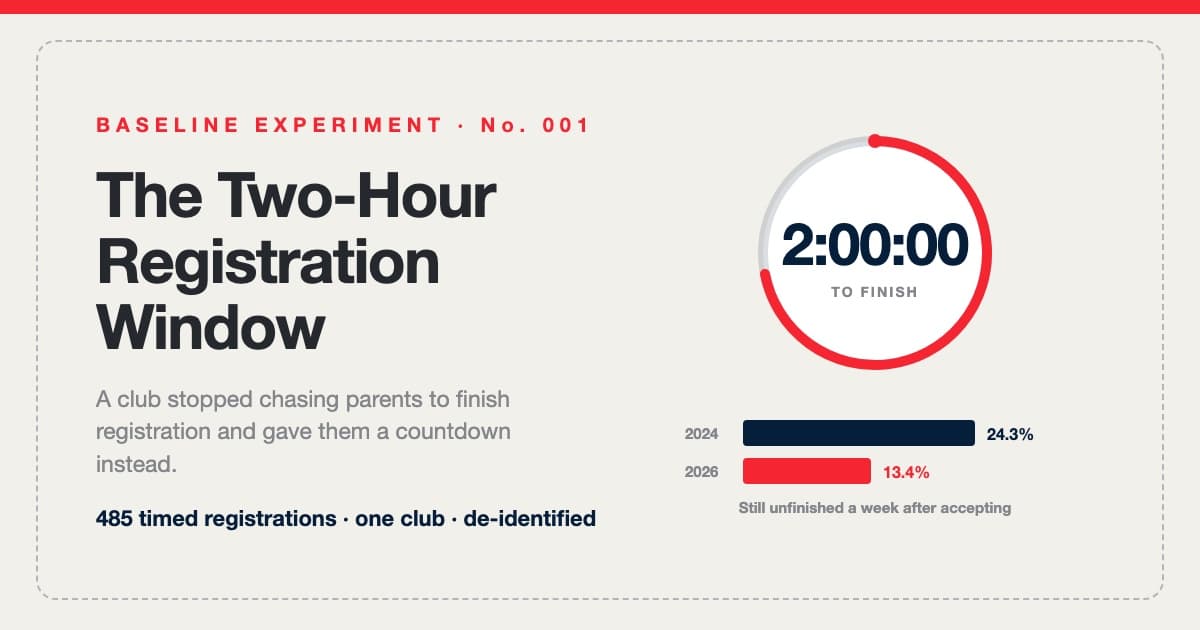
The Two-Hour Registration Window: Urgency Without Attrition
One large youth baseball club was tired of chasing parents to finish registration, so we gave families a 120-minute countdown instead. 485 timed registrations later: completion held, the week-old follow-up list came in 45% shorter, and 95 of 98 second windows opened with the family already in the form. The full experiment log — including the claim we couldn't verify.
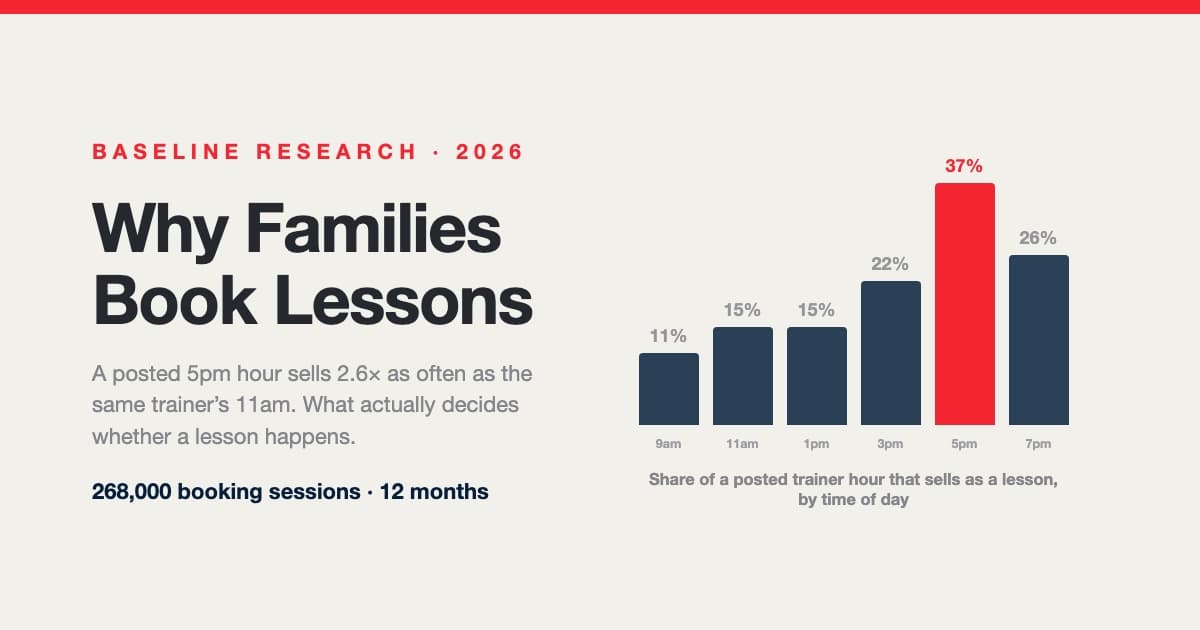
Why Families Book Lessons — and Why They Don't: A Year Inside 268,000 Booking Sessions
A posted 5pm hour sells nearly three times as often as the same trainer's 11am. Across 268,000 booking sessions, 29,812 families and 107,000 posted trainer shifts, what decides whether a lesson happens isn't price, sport or lesson length — it's which hours are on the calendar and how late families go looking. Including a measured answer to the question every operator asks: do 15-minute intervals actually win you bookings?