
How to Automate Sports Facility Booking: A Complete Guide Using Baseline
A 7-step guide to automating sports facility bookings with Baseline — from assessing your workflow and configuring facilities to payments, notifications, analytics, and ongoing optimization.
Managing facility bookings by hand drains time and leaves revenue on the table. Whether you run a municipal complex, a private club, or a community recreation center, automation can sharply improve efficiency, increase revenue, and elevate the customer experience. This is a step-by-step guide to automating your booking operations with Baseline.
Why Sports Facility Booking Automation Matters
Sports facilities face a recurring set of operational headaches: double-bookings, scheduling conflicts, maintenance gaps, and manual payment processing — all of which cost revenue and frustrate customers. Facilities that implement automated booking systems see a 40% reduction in administrative overhead and a 35% increase in utilization rates.
Sports facility management software provides real-time availability tracking, instant confirmations, and seamless integration with existing operations — so accurate information stays consistent across every channel, from your website to your front desk.
How Baseline Approaches Booking Automation
Baseline is built for operational efficiency across public and private sector organizations. Its platform adapts to sports facility booking through:
- Real-time scheduling and task management. Dynamic scheduling keeps everyone synchronized and eliminates double-bookings.
- Customizable workflows. Solutions tailored to your operation, from simple reservations to complex membership management.
- Seamless integration. Robust APIs connect booking to payment processing, membership databases, and facility tools.
- Scalability. Works for everything from a small community center to a large multi-facility complex.
Step 1: Assess Your Current Booking Operations
Before automating anything, understand how you operate today.
- Document your current workflow. List every booking step — how customers reserve, what information you collect, and how long confirmations take.
- Identify pain points. Manual entry errors, scheduling conflicts, trouble accessing real-time availability, and slow confirmations.
- Define your requirements. Multiple facility types (courts, fields, pools, gyms); flexible time slots (hourly, half-day, full-day); membership management; multi-location support; payment integration; automated confirmations and reminders; cancellation and rescheduling policies; reporting and analytics.
Step 2: Configure Baseline for Your Facility
Set Up Your Facility Structure
In facility management software for basketball arenas, create a digital model of each location, capturing court and field dimensions and specifications, operating hours and closure dates, maintenance schedules, and any special conditions or restrictions.
Create Facility Slots and Availability
Define booking slots with regular weekly availability patterns, seasonal changes, one-time closures for maintenance or special events, and blackout periods for league play or tournaments.
Configure User Roles and Permissions
- Members booking slots up to 30 days in advance
- Casual players booking 7 days in advance
- Staff overriding bookings for maintenance or special events
- Managers accessing full reporting and analytics
Step 3: Integrate Payments and Memberships
Connect payment gateways. Baseline integrates with processors like Stripe, PayPal, and Square to capture booking fees automatically. See how payments work in Baseline.
Implement membership tiers. Build levels such as general memberships with unlimited bookings, limited memberships with restrictions, youth and senior discounts, and corporate packages for business teams — all manageable through Baseline memberships.
Automate invoices and receipts. Baseline generates invoices and emails receipts automatically the moment a booking completes.
Step 4: Set Up Automated Notifications
- Booking confirmations. Sent instantly with booking details, location, directions, parking info, and facility rules.
- Reminder communications. 7-day advance reminders, 24-hour confirmations, and 2-hour courtesy notices reduce no-shows.
- Custom message templates. Facility-specific branding, logos, and special instructions.
- Cancellation and rescheduling notices. Keep both parties informed and re-open freed slots immediately.
Step 5: Optimize Utilization with Analytics
Track booking patterns to learn which slots are most popular, which facilities have the highest demand, and when space sits idle — then adjust pricing, marketing, and staffing accordingly.
Analyze customer behavior. Baseline reports on booking frequency by segment, peak utilization periods, cancellation rates and reasons, revenue per facility per period, and membership retention.
Forecast demand using historical data to plan staffing, maintenance, and pricing. Monitor operational efficiency by tracking average booking-to-confirmation time, customer satisfaction, staff productivity, and maintenance issues.
Step 6: Train Staff and Communicate with Customers
Train your team on viewing and managing bookings, handling exceptions, processing refunds and modifications, using reporting, and troubleshooting common issues.
Communicate with customers by giving advance notice of the benefits, clear booking instructions, multiple channels (phone and online), website FAQs, and trial periods. Establish clear support channels through email, phone, or live chat.
Step 7: Monitor, Measure, and Optimize
Set and review key performance indicators:
| KPI | Target / focus |
|---|---|
| Facility utilization rate | 70–85% |
| Average revenue per facility / month | Trend upward |
| Customer satisfaction score | Survey-based |
| Booking confirmation time | Minimize |
| System uptime and reliability | Maximize |
Run monthly or quarterly reviews using Baseline's analytics, gather customer feedback to find friction points, and adapt settings, pricing, and scheduling based on real performance data.
Baseline's Platform-Specific Benefits
- Customization without coding. Configure through a user-friendly interface — no IT expertise required.
- Direct access to product development. Your feedback feeds directly into product improvements.
- Comprehensive support. Built-in support tools plus dedicated teams.
Common Challenges and Solutions
| Challenge | Solution |
|---|---|
| Double-booking in the transition period | Run old and new systems in parallel for 2–4 weeks |
| Staff resistance to new systems | Involve staff early, train, and recognize adopters |
| Customers prefer calling over booking online | Keep phone support initially; educate on online benefits |
| Legacy integration seems complicated | Technical account managers guide you step by step |
Transition smoothly
Transforming Your Facility Operations
Automating bookings creates the modern, customer-friendly experience that keeps facilities competitive. From real-time availability and seamless booking to automated confirmations and analytics, Baseline provides the operational backbone thriving facilities need. The journey takes planning, but the gains in efficiency, revenue, and satisfaction make it worthwhile — start with assessment, configure methodically, and keep optimizing.
Baseline offers sports facility management with transaction-based pricing — no monthly subscription, processing fees only, with the option to pass them through to customers. See our pricing or book a demo to get started.
Baseline is the all-in-one operating system for sports facilities, clubs, and travel teams — scheduling, payments, programming, and team management in one platform.
Keep reading
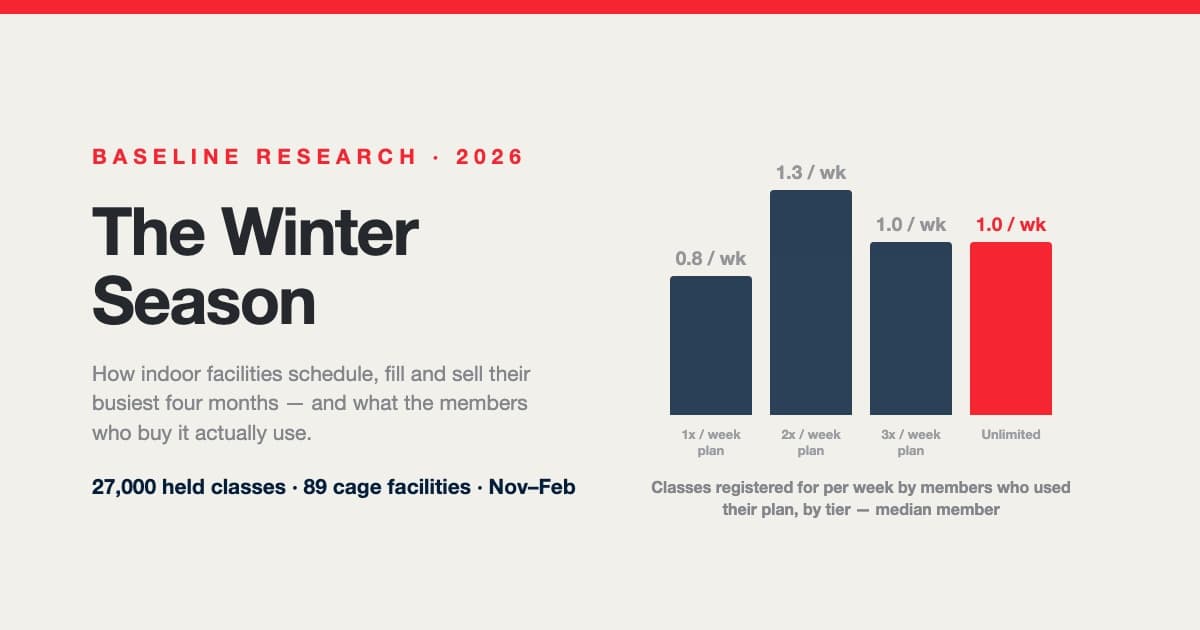
The Winter Season: How Indoor Facilities Schedule, Fill and Sell Their Busiest Four Months
Winter is the season an indoor facility is built for, and every autumn operators rebuild the same schedule from instinct. Across 27,000 held classes at 89 cage-equipped facilities: pitching needs nearly as much room as hitting, the median class has three or four athletes, one hitting program in ten runs every prime hour, classes tie up two-thirds of the cages only at the busiest hour, “unlimited” members come about once a week — and the plan a family buys, not how often they come, decides when they leave.
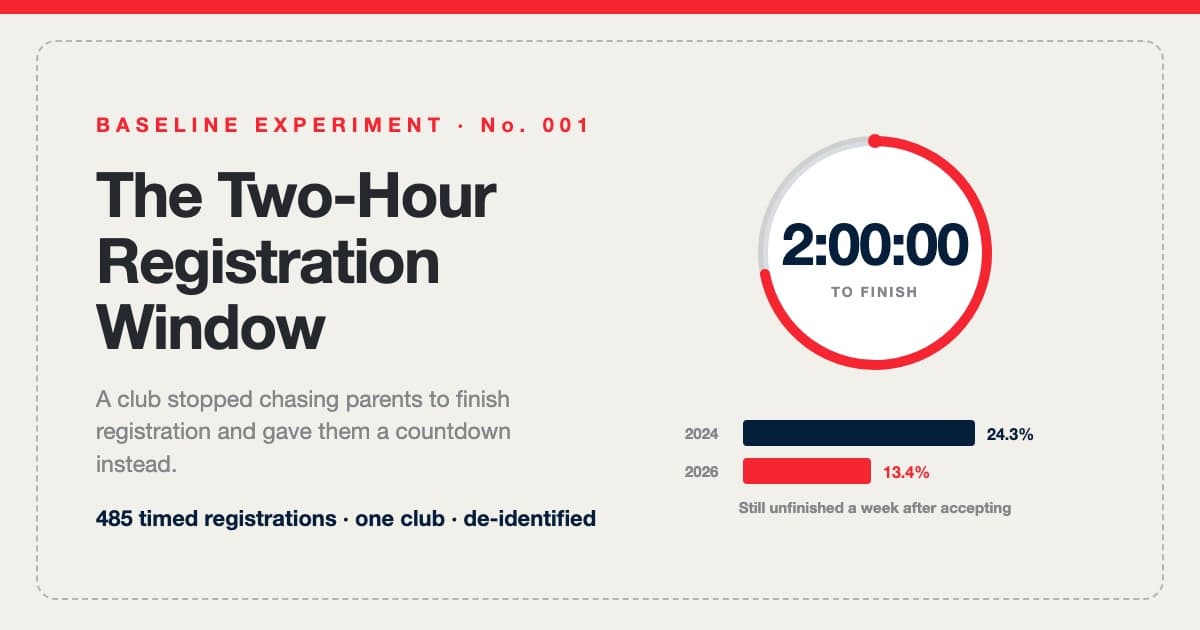
The Two-Hour Registration Window: Urgency Without Attrition
One large youth baseball club was tired of chasing parents to finish registration, so we gave families a 120-minute countdown instead. 485 timed registrations later: completion held, the week-old follow-up list came in 45% shorter, and 95 of 98 second windows opened with the family already in the form. The full experiment log — including the claim we couldn't verify.
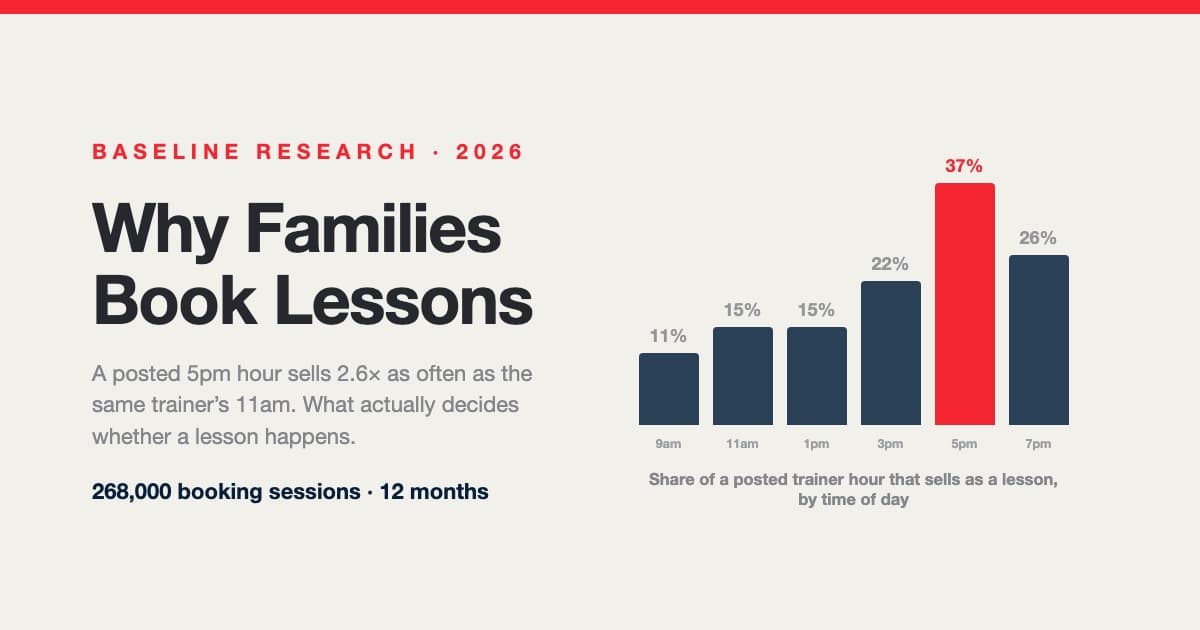
Why Families Book Lessons — and Why They Don't: A Year Inside 268,000 Booking Sessions
A posted 5pm hour sells nearly three times as often as the same trainer's 11am. Across 268,000 booking sessions, 29,812 families and 107,000 posted trainer shifts, what decides whether a lesson happens isn't price, sport or lesson length — it's which hours are on the calendar and how late families go looking. Including a measured answer to the question every operator asks: do 15-minute intervals actually win you bookings?